 8893d2431c
With dark theme otherwise theme stays dark for Fast Loading. Also added to readme that the the font for the date is increased with setting to hide the battery. |
||
|---|---|---|
| .. | ||
| ChangeLog | ||
| README.md | ||
| andark_icon.png | ||
| andark_screen.png | ||
| andark_screen_light_weekday_nobatt.png | ||
| app.js | ||
| app_icon.js | ||
| metadata.json | ||
| settings.js | ||


README.md
Dark Analog Clock
Features
- second hand (only on unlocked screen)
- date
- battery percentage (showing charge status with color)
- turned off or swipeable widgets (choose in settings)
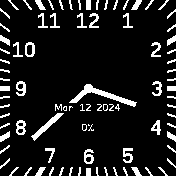
Default settings
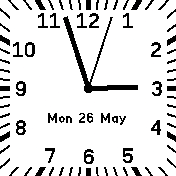
Following system theme, with weekday shown and battery hidden
Settings
- whether to load widgets, or not; if widgets are loaded, they are swipeable from the top; if not, NO ACTIONS of widgets are available
- date and battery can be printed both below hands (as if hands were physical) and above (more readable)
- hour hand can be made slighly shorter to improve readability when minute hand is behind a number
- show the weekday and not the year
- hide the battery percentage; the font for the date is increased since there is more space
- dark theme (enabled by default); disable to follow system theme