 ce8cf1d542
This copies changes from bwclk into bwclklite. For reference, see PR #3845 and commits |
||
|---|---|---|
| .. | ||
| ChangeLog | ||
| README.md | ||
| app-icon.js | ||
| app.js | ||
| app.png | ||
| metadata.json | ||
| screenshot.png | ||
| screenshot_2.png | ||
| screenshot_3.png | ||
| settings.js | ||


README.md
BW Clock Lite
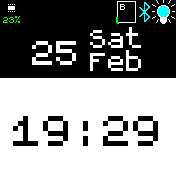
This is a fork of a very minimalistic clock.
Features
The BW clock implements features that are exposed by other apps through the clkinfo module.
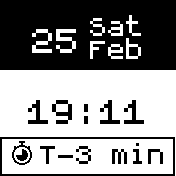
For example, if you install the Simple Timer app, this menu item will be shown if you first
touch the bottom of the screen and then swipe left/right to the Simple Timer menu. To select
sub-items simply swipe up/down. To run an action (e.g. add 5 min), simply select the clkinfo (border) and touch on the item again. See also the screenshot below:
Note: Check out the settings to change different themes.
Settings
- Screen: Normal (widgets shown), Dynamic (widgets shown if unlocked) or Full (widgets are hidden).
- Enable/disable lock icon in the settings. Useful if fullscreen mode is on.
- The colon (e.g. 7:35 = 735) can be hidden in the settings for an even larger time font to improve readability further.
- Your bangle uses the sys color settings so you can change the color too.
Thanks to
- Thanks to Gordon Williams not only for the great BangleJs, but specifically also for the implementation of
clkinfowhich simplified the BWClock a lot and moved complexety to the apps where it should be located. - Icons created by Flaticon
Creator
Contributors
thyttan