 33fd0ab4fe
|
||
|---|---|---|
| .. | ||
| ChangeLog | ||
| README.md | ||
| app-b1.js | ||
| app-b2.js | ||
| app-icon.js | ||
| icon.png | ||
| metadata.json | ||
| screenshot.jpg | ||
| settings-b1.js | ||
| settings-b2.js | ||
| shot1.png | ||
| shot2.png | ||
| shot3.png | ||
| sshot_e1.png | ||


README.md
Desktop style App Launcher
Bangle 1:

In the picture above, the Settings app is selected.
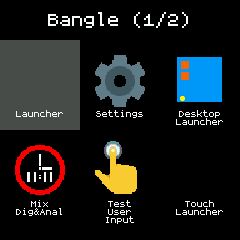
Bangle 2:


Controls
Bangle 1
BTN1 - move backward through app icons on a page
BTN2 - run the selected app
BTN3 - move forward through app icons
Swipe Left - move to next page of app icons
Swipe Right - move to previous page of app icons
Touch Left(1) area - "Back" to Clock
Touch Right(2) area - move forward through app icons
Touch Middle(1+2) area - run the selected app
Bangle 2
Touch - icon to select, second touch launches app
Swipe Left/Up - move to next page of app icons
Swipe Right/Down - move to previous page of app icons
Settings
Show clocks
Show launchers
Only Bangle 2
Direct launch - launch on first touch.
Swipe Exit - Swipe left to exit.
Time Out - Return to clock after a short while.
Interaction buzz
Remember Page - Remember page when leaving and coming back to the launcher.